Start with Garden to learn Ringbloom’s ring turns. Choose Flower Show when you want a particular objective to work towards, and consider the Champion Circuit after the campaign if you want more Classes. You can try Garden and the first five Flower Show Classes before paying for the rest.
We make Ringbloom. It is an iPhone puzzle with no timer: select a ring, turn it and line up matching petals. This WeEvolve Games guide explains the choices using our product information and the current App Store description, checked on 16 October 2026. The screenshots are our existing product captures; this is a mode guide, without a hands-on review or a promise about how long a run will take.
Start in Garden to learn what a turn changes
Garden is the free, endless mode. Select the inner, middle or outer ring, then turn it left or right to align three matching petals across a spoke. The product page describes the same central action used in Flower Show.
For your first few decisions, look at one spoke and ask which ring would bring its petals together. After a turn, read the new arrangement before choosing again. Moving a ring changes the petals around the board, so the match you first noticed is only one part of that decision.
An endless mode gives you a place to keep playing the core puzzle. It still has a move limit: the developer description says to keep the garden growing before your moves run out. Having no timer means you can take time over a choice; it does not mean unlimited moves.
Choose Garden when you want to practise that basic action without selecting a campaign Class. Once you have your first Garden win, the listing’s version history describes access to Flower Show. The first five Classes are free, so you can compare the two formats yourself.
Pick Flower Show for a goal you can inspect
Flower Show is a campaign of 30 Classes with objectives and special rules. The useful change is in what you need to achieve with your turns. Read the Class’s objective and rule before deciding that an ordinary bloom is the move you need.
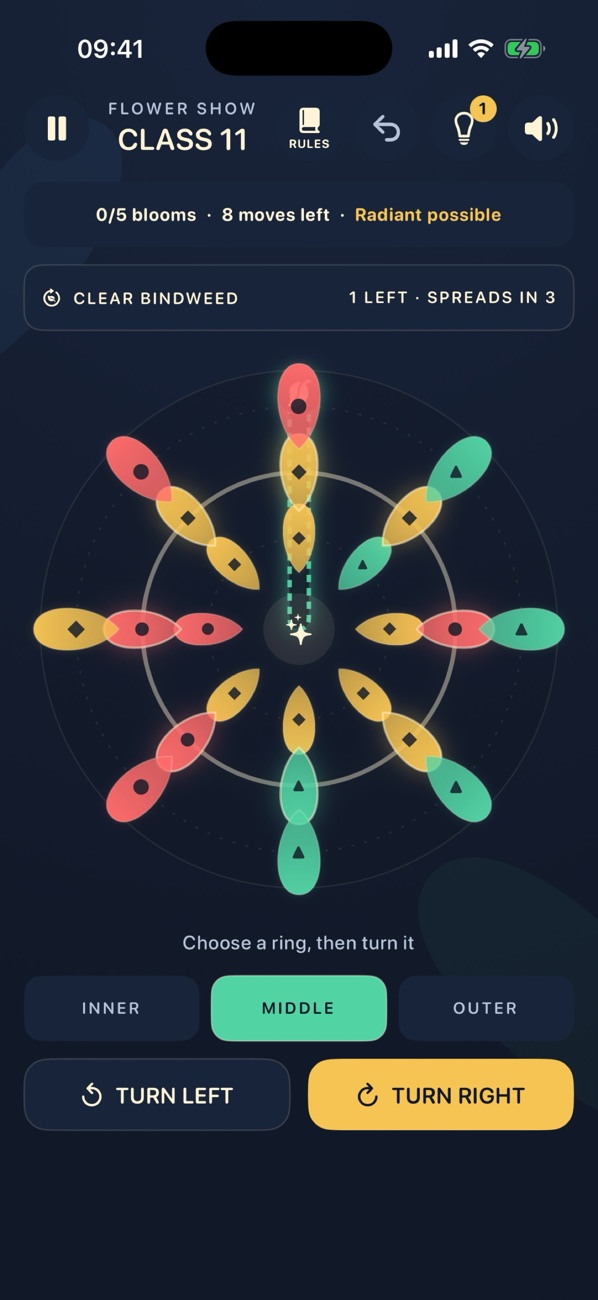
Use those visible objectives as a short checklist before a turn:
- What still needs completing in this Class?
- How many moves remain?
- What does its special rule change about the move you are considering?
The listing’s Flower Show description and version history explain that Classes introduce rules and show live objectives. They also describe Hint and Undo support, including rating consequences. Read the feedback when using either; this guide does not promise that help leaves your rating unchanged.
Replay a Class when improving it is the goal
You can return to completed Classes through the Class Book and work on their ratings. That offers a different reason to play from simply reaching the next Class: choose a familiar objective and try to improve your result.
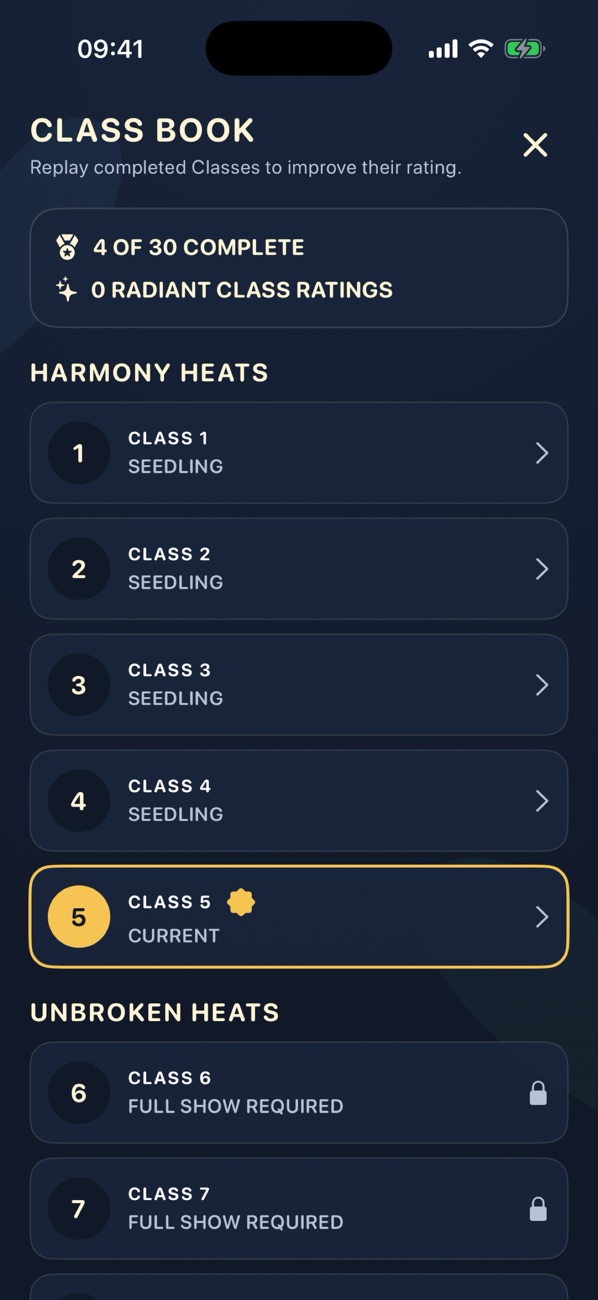
The screenshot shows the purchase boundary at Class 6. Garden and Classes 1-5 are free. One permanent Complete Flower Show purchase opens Classes 6-30 and the Champion Circuit, with no subscription. Check the current price in your own App Store before buying.
Save the Champion Circuit for after the campaign
The Champion Circuit continues Flower Show beyond the campaign’s Grand Final. The developer’s version history describes curated Circuit Classes followed by an endless catalogue. It is included in the permanent purchase, so it is a later route for someone who wants more of the Class format.
There is no need to decide about that before trying the free content. Start with Garden, try the first five Classes, then consider whether their objectives and ratings are what you want more of. If rotating and matching in Garden is enough, you can keep playing that free mode.
Set up before playing away from a connection
Ringbloom’s offline FAQ confirms offline gameplay and on-device progress. Downloading the app and making or restoring a purchase need a connection. Complete those steps before relying on the game during travel; on-device progress is not a promise of cross-device synchronisation.
For a different puzzle mechanic, our rings, paths or paper guide compares Ringbloom with LYNE and KAMI 2. To try the choices described here, visit the Ringbloom page and start with its free Garden.
Back to all guides →