Before settling into a colour puzzle, check that you can distinguish its pieces, read its goals and operate its controls with your usual phone settings. Try a move and read the result. A still image can show symbols and labels; the game on your phone lets you judge whether they work for you.
We make Ringbloom, an untimed iPhone puzzle whose petals have glyphs as well as colours. Its current App Store description also lists VoiceOver, Larger Text and Reduce Motion support. This guide uses those published details and an existing WeEvolve screenshot to give you a setup checklist. We have not carried out a new device or accessibility test for this article.
Follow the symbols across a spoke
Ringbloom asks you to select the inner, middle or outer ring and turn it left or right. Matching petals across a spoke make a bloom. Before planning a sequence, look for the repeated glyph inside each petal.
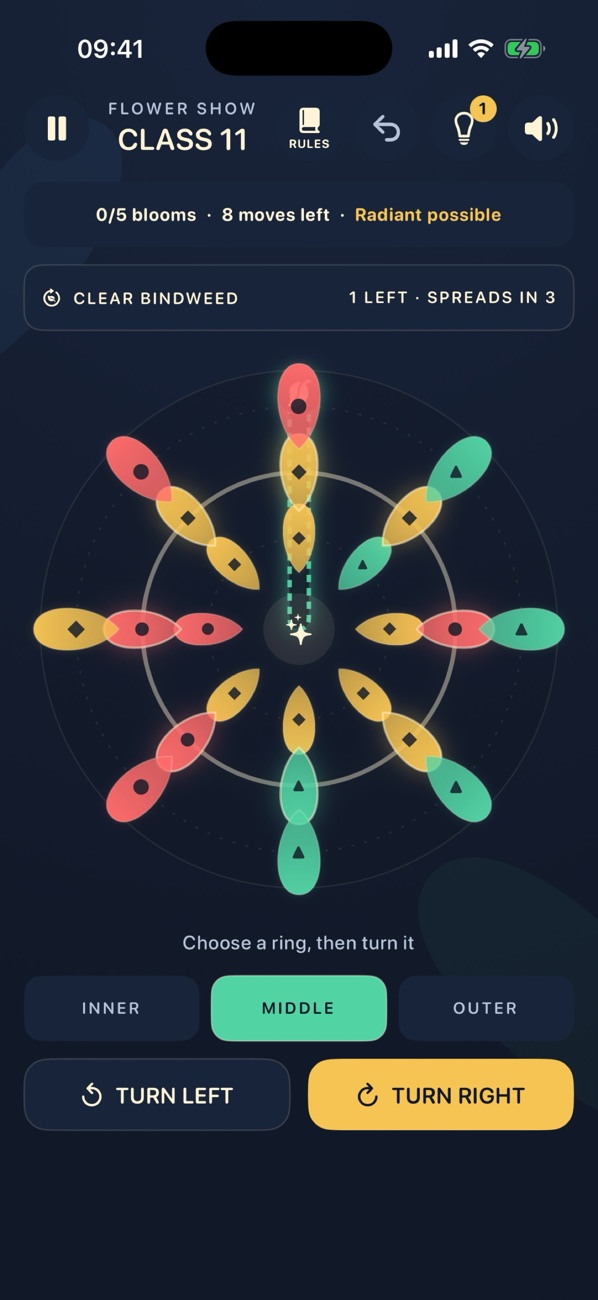
In this capture, you can follow a circle, diamond or triangle across each ring without using the colour name. On your phone, check whether the glyphs stay distinct at the size you normally play. Try one ring turn, then find the same symbols in their new positions.
Glyphs answer one specific question: how can you distinguish petals without relying on colour alone? They do not tell you whether the text, controls or animations suit you. Check those separately.
Read the goal and the move count
The pictured Class shows a bloom target, a bindweed objective and eight moves left. Make sure you can find each piece of information before choosing a turn. After moving, check what changed in the board and the objective text.
Ringbloom has no timer, so you can take time over a decision. It still has a move limit. If an untimed game is what you need, check both points in the description instead of treating “untimed” as a promise of unlimited turns.
The ring controls provide another useful check. Can you tell which ring is selected? Can you read the two turn labels and use them without an awkward grip? The listing describes one-thumb play, but your own reach and preferred way of holding the phone are what matter here.
Try your text and motion preferences
Apple lets you choose text, colour and motion settings for individual apps. Its per-app settings instructions give the route: Settings, Accessibility, Per-App Settings, Add App, then select the app and open its settings.
Use your preferred text size and available motion settings, reopen the game and inspect a board. Check the objective, remaining moves, ring selection and turn controls again. Look for labels you cannot read or controls you cannot reach. A bigger label is useful only if the information and action you need remain available.
For the phone-wide option, Apple’s motion guide places Reduce Motion under Settings, Accessibility, Motion. Ringbloom’s description states support; this guide does not promise that every animation disappears. Try a turn and its resulting bloom to judge the movement yourself.
Use the listing as a starting point for VoiceOver
If you use VoiceOver, read the current listing’s Accessibility section as well as the description. Ringbloom’s UK listing identifies VoiceOver, Larger Text and Differentiate Without Colour Alone support. Those are developer-provided statements, checked on 30 October 2026.
Apple’s accessibility label guidance says support should cover an app’s common tasks. For a puzzle, a useful personal trial is to find the current objective, inspect the pieces, select a control, make a move and understand the result. Reaching a menu alone leaves the board interaction unchecked.
This article does not independently verify Ringbloom’s VoiceOver behaviour. If a required action is unclear in your trial, use the Ringbloom support page to describe the screen, phone and setting involved.
Start with the free Garden
Garden and the first five Flower Show Classes are free; the later Classes and Champion Circuit are included in a permanent purchase. Start with Garden to check the basic matching and controls with your own settings before deciding about more content.
Our mode guide explains where Flower Show fits when you want particular objectives. For the setup checks here, visit Ringbloom and try its free Garden with the text, motion and control preferences you normally use.
Back to all guides →