If you are stuck in a Ringbloom Flower Show Class, decide what you want from this attempt before using help. To understand a turn, consider Hint or Undo and read the rating feedback. To improve a completed result, return through the Class Book with one specific decision to reconsider.
We make Ringbloom. Its Flower Show lets you replay completed Classes and work on their ratings. This guide uses the released game’s App Store description and version history and an existing owned screenshot. It is a way to organise an attempt, rather than a tested solution to a particular board.
Give this attempt one purpose
You might want to understand a special rule, finish a Class or improve a previous rating. Choose one for now. That gives you a reason for using help, or for trying a move without it.
Before turning a ring, say what you expect to change. For example: “I am turning the middle ring to bring matching petals onto this spoke.” After the turn, compare that expectation with the board and the live objective. If they differ, identify the difference before making another move.
This is a suggested thinking routine, not a promise of a better score. You can use it without writing anything down. Ringbloom has no timer, although moves can run out, so taking longer to inspect a choice is different from spending another turn.
Ask for a Hint when the next choice is unclear
Use a Hint when you want the game to help with a difficult choice. Then look at the current objective and ask what the help tells you about it. Try to put that connection into your own words before continuing.
The listing describes Hint and Undo support with visible rating consequences. Read the game’s current feedback before using either when a rating matters to you. This guide does not give a penalty formula or promise that assistance preserves your best available rating.
Use Undo to examine a decision
Undo offers a way to try another idea. Before using it, identify the turn you want to reconsider and what you would look at differently. Otherwise, you may simply repeat the same choice.
You could compare which ring you selected, the direction you turned it and the objective you were trying to advance. Those are questions to investigate on your own board; they are not a winning move sequence. Check the feedback about ratings here too.
Replay a completed Class with a smaller question
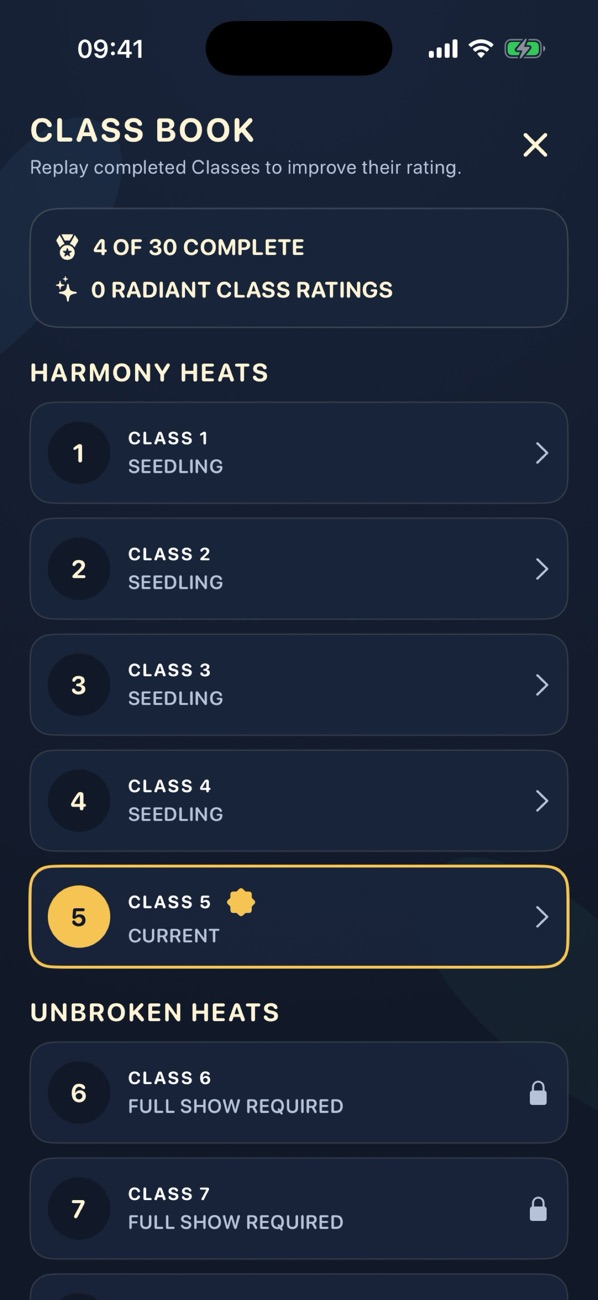
The Class Book gives completed puzzles a second use: you already know their goal, so you can focus on a decision you found difficult. Pick one question, such as whether you noticed the special rule before spending a turn. See what you can explain after the replay, as well as checking the resulting rating.
There is no need to turn every session into a rating attempt. You can finish with a clearer understanding of one choice and leave a stronger result for another visit.
Try the free Classes before buying more
Garden and the first five Flower Show Classes are free. One permanent purchase opens the remaining campaign Classes and the Champion Circuit. Our mode guide explains that progression; the readability checklist helps if the difficulty is seeing the symbols or controls.
For your next attempt, choose one goal and read the feedback before asking for help. Visit Ringbloom to start with the free Garden and explore the first Flower Show Classes.
Back to all guides →